Virtual lab: Electrical Engineering
Virtual electrical engineering lab for students
The iUNI virtual electrical engineering lab is an electrical room in a 3D campus. Students explore components, use a tool station and work through a circuit exercise, changing one setting at a time and watching the measurements. An AI lecturer explains what they see. It opens in a browser or headset.
Live at lab.iuni.ai · no install needed
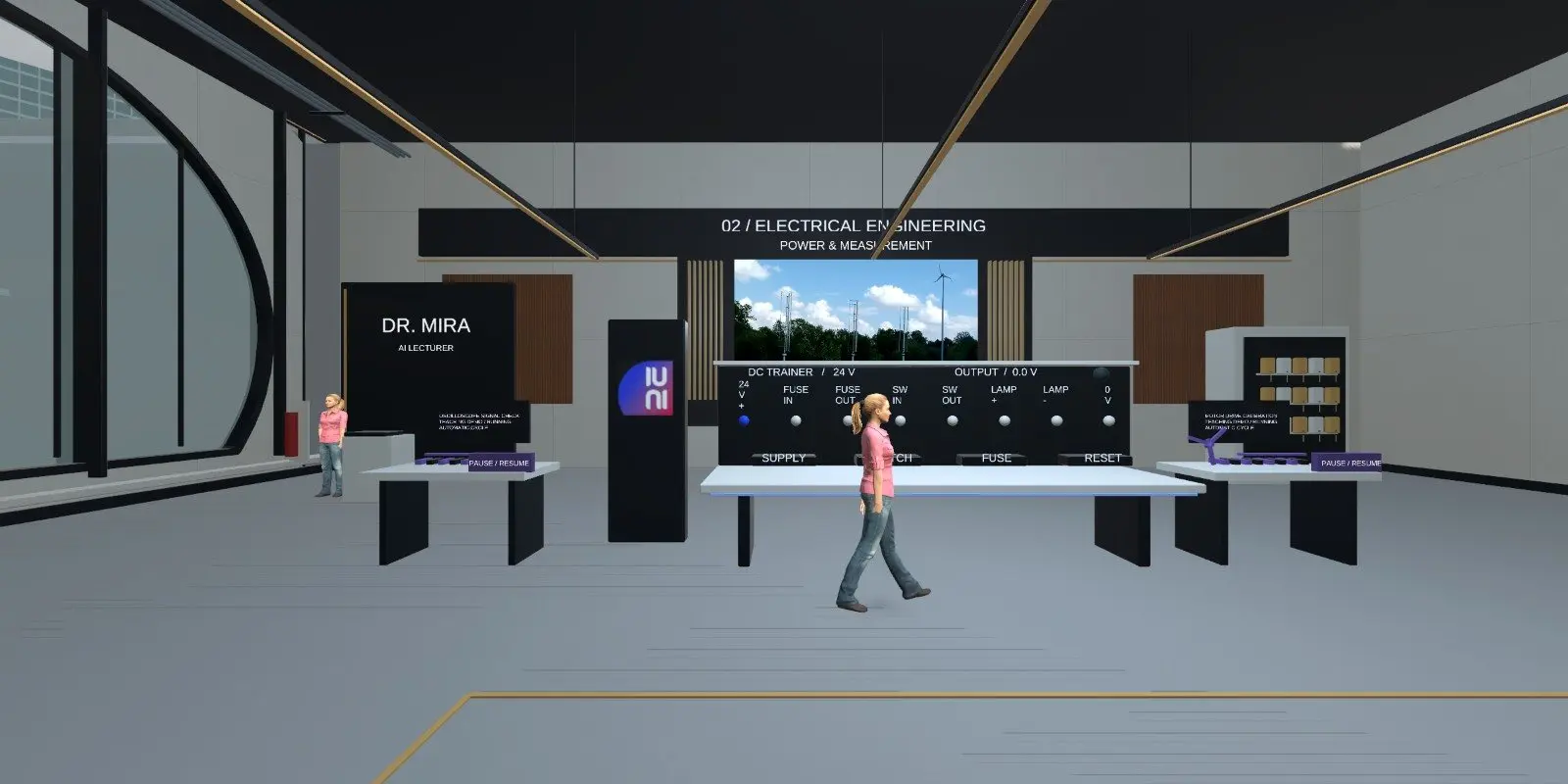
What is inside the virtual electrical lab?
Learners find the electrical room through the lab library. A room board lists the tool and equipment stations in the room.
- Components to explore, so learners link what a part does to how a circuit behaves.
- A tool station and an equipment station.
- A circuit with controls for source, load, switch and connection.
- Simulated measurements shown against the circuit state.
- A room lecturer who answers questions about what the circuit is doing.
What can students practise on an electrical training simulator?
The main exercise is bounded and deliberate. Learners change one setting at a time, then compare the circuit state and the measurements. The aim is to explain why a circuit changes state, not just to see that it did.
They can ask the lecturer about any state they observe. The guide notes that the lecturer uses cloud AI and that prepared explanations and the lab guide are available when it is not.
The guide is open about scope: not every visible instrument has a full manufacturer-equivalent simulation, and the guide lists the controls each activity supports.
Who is the virtual electrical lab for?
Colleges and universities can use it for introductory circuit work and revision away from the bench. Training providers can use it to prepare learners before supervised practical sessions. Employers can use it to refresh basic circuit reasoning for new starters.
It suits learners who need to build intuition about cause and effect in a circuit. It is not a substitute for supervised work on live electrical equipment, and it does not replace mandatory electrical safety instruction.
How do you open the virtual electrical lab?
Open https://lab.iuni.ai in a desktop web browser, enter a display name and choose whether to switch your microphone on. There is nothing to install. On a VR headset, open the same address in the headset browser, for example the Meta Quest browser, and use the WebXR entry.
Choose Electrical from the lab library to find the room. Learners can ask the lecturer questions about what they see.
How does it compare with a physical electrical lab?
| Virtual electrical lab | Physical electrical lab | |
|---|---|---|
| Handling real components and tools | No | Yes |
| Try a change with no damage to parts | Yes | Parts can fail |
| Available outside timetabled hours | Yes, in a browser | Limited by room access |
| Real measurement skills with test equipment | Not covered | Yes |
| Explanation on demand | AI lecturer in the room | Depends on staff cover |
Questions people ask
What is a virtual electrical engineering lab?
It is a 3D electrical lab that learners open on a screen or in a headset. In iUNI, it is an electrical room with component exploration, a tool station and a circuit exercise, where learners change settings and watch simulated measurements respond.
Can students use it without a headset?
Yes. It opens in a desktop web browser at lab.iuni.ai with nothing to install. Headsets are optional. A WebXR-capable headset browser, such as the Meta Quest browser, can open the same campus in VR.
Does the AI lecturer replace a teacher?
No. The lecturer explains the circuit state a learner is looking at and answers questions about it. It uses cloud AI, and prepared explanations and the lab guide are there when it is unavailable. Teachers still set the learning goals and check understanding.
Is every instrument fully simulated?
Not necessarily. The lab guide says not every visible instrument has a full manufacturer-equivalent simulation, and that each activity lists the controls it supports. Check the guide to see what each exercise covers before you plan a session around it.
Does this replace electrical safety training?
No. It is a teaching simulation for understanding circuits. It does not replace mandatory safety instruction or supervised practical work on real electrical equipment. Use it for understanding and practice, and keep live work for the workshop under supervision.
Related
See it with your own programmes
Tell us what you teach or train, roughly how many learners, and your timeline. We'll show you how iUNI fits.